


2.5 Gbps PoE injector WiPower® Pro
2.5G PoE Injector Up to 30W - WiPower® Pro
Power an IP camera or a WiFi access point through its network cable, with no electrical socket on site.
- ✓PoE up to 30 W, 52 V DC output
- ✓Ethernet up to 2.5 Gbps
- ✓Up to 100 m with a cat6 or higher cable
- ✓110–240 V mains input, no configuration
Tax included.
In stock, Shipment before 24 November
 Free delivery
 14-day returns
 Ships within 48 hrs
 Secure payment
Description
The WiPower® Pro is a 2.5G PoE injector that transmits network data and power through a single Ethernet cable. It delivers up to 30W, supports speeds up to 2500 Mbps, and operates over distances of up to 100 metres using a Cat6 cable or higher.
Specifications
Compatibility
Delivery & returns
Orders ship within 48 hrs and are delivered in 7 to 10 days with tracking. Free delivery on all orders. You have 14 days after receipt to request a return.

2.5G PoE Injector Up to 30W - WiPower® Pro
No electrical socket where the camera goes
A camera or a WiFi access point placed far from a socket requires two cables, or a full PoE switch for a single device.


Without an injector: A network cable and a power cable to run all the way to the device.
With WiPower® Pro: A single network cable carries data and power, up to 100 m with a cat6 or higher cable.

30 W and 2.5 Gbps in a single cable
The injector supplies up to 30 W at 52 V DC and transmits data at up to 2.5 Gbps, over a maximum of 100 m with a Cat 6 or higher cable. The actual speed also depends on your router or switch and on the powered device.
Two network ports and a mains socket
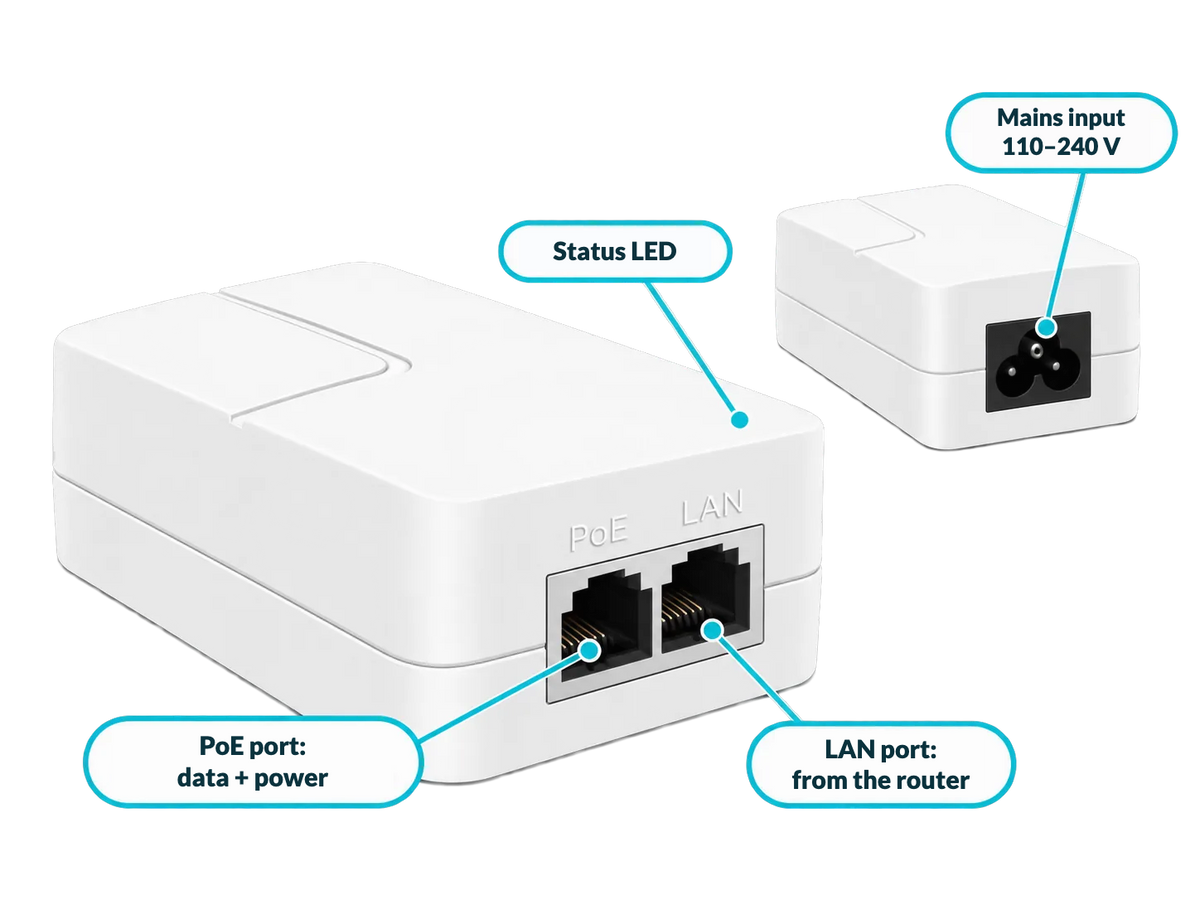
The LAN port receives the network from your router or switch; the PoE port sends data and power to the device. The injector plugs into a 110–240 V wall socket, indoors or in a protected enclosure.
Uses to suit your needs

Outdoor camera
The injector stays indoors; only the network cable goes out to the IP camera.

WiFi access point
Place an access point on the ceiling or in a hallway, away from power sockets.

Network bridge
Power a network bridge between two buildings through its Ethernet cable.

IP telephony
Power a PoE-compatible IP phone from the network.
Setup in 3 steps

Connect to the network
Plug the LINK port (2.5 Gbps) into your router or switch.
Connect the device
Plug the PoE port into the camera or access point with a cat6 or higher cable.
Plug into the mains
Plug the injector into a 110–240 V wall socket indoors. The device receives power and data, with no configuration.
Before ordering
Check in the datasheet of your camera or access point that it accepts PoE at 52 V (pins 1/2+, 3/6-) and 30 W maximum. Install the injector somewhere sheltered, and leave any work on the electrical installation to a qualified professional.

Frequently asked questions
What is PoE?
Is my device compatible?
Which cable should I use?
How many devices can I power?
Can it be installed outdoors?
A problem during installation?
Picture installation guide
5 illustrated steps to prepare and connect your WiPower® Pro.


Our guarantees
Free delivery
Dispatched within 48 hours, delivered in 7 to 10 days with tracking.
14-day returns
You have 14 days after delivery to request a return.
Secure payment
Encrypted payment at checkout.
UK support
By email at support@wiboostpro.com or by phone on +44 20 8154 4663, Monday to Friday, 10:00 to 18:00.